Anyone running an e-commerce fashion brand knows the pain: shooting a proper set of on-model photos is exhausting, slow, and absurdly expensive.
Anyone running an e-commerce fashion brand knows the pain: shooting a proper set of on-model photos is exhausting, slow, and absurdly expensive.
Under traditional photoshoot workflows, you have to source models, book studios, hire stylists and makeup artists, manage setup on location, and then wait weeks for post-production editing. A single session easily runs into thousands of dollars and takes one to two weeks to turn around. For SMB apparel brands, DTC sellers, and cross-border teams, these high costs and slow timelines seriously delay new arrivals and ad testing.
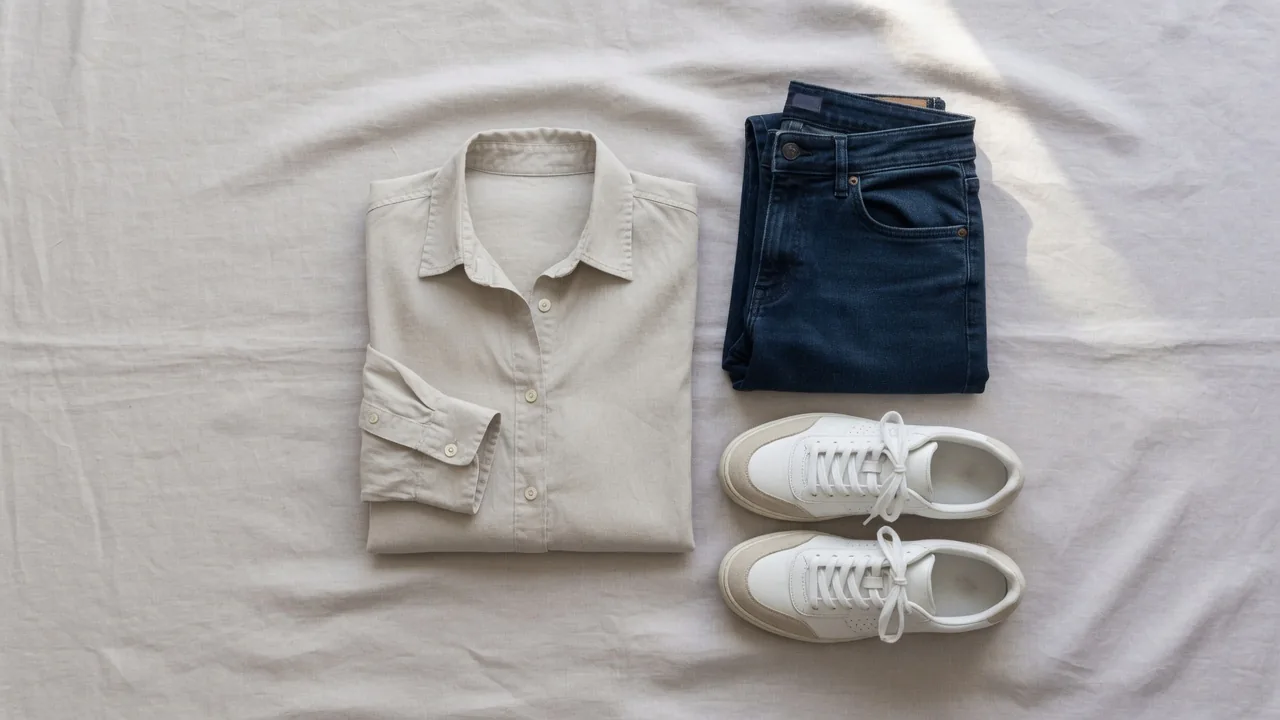
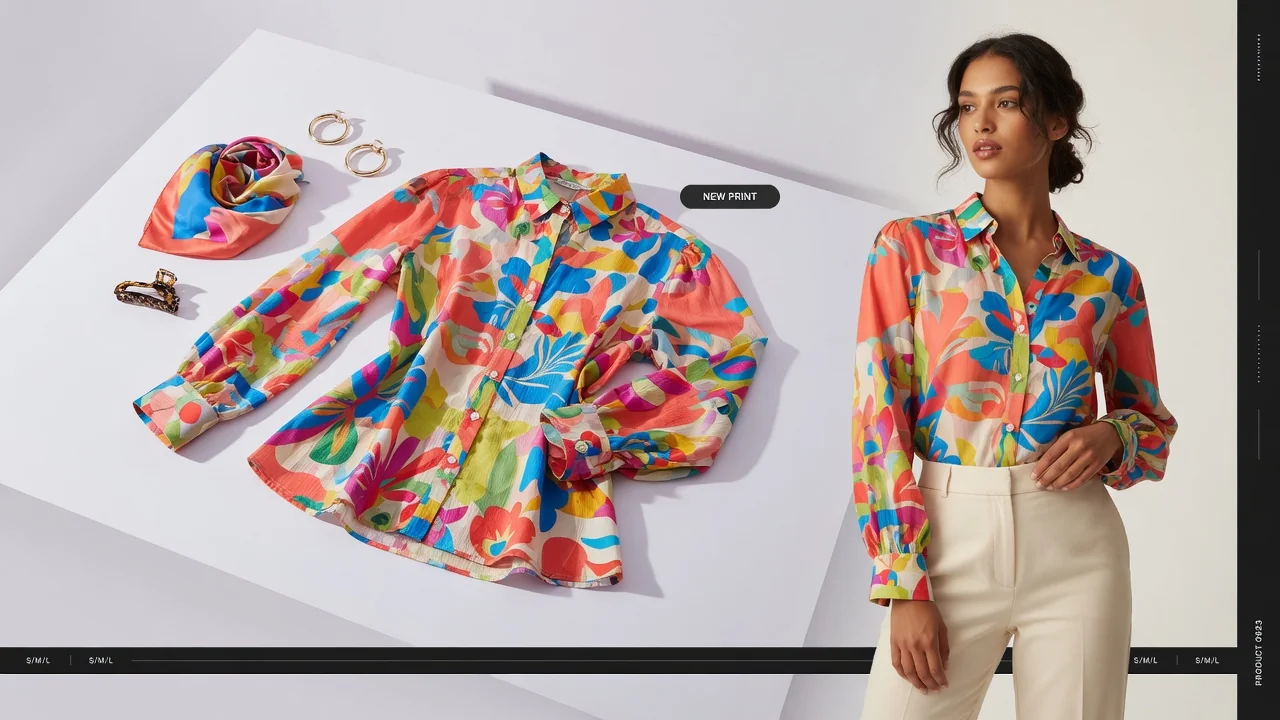
To save money, many sellers resort to shooting flat lays or mannequin hanger shots. Flat lays have a low barrier to entry, shoot fast, and cost next to nothing. But when it comes to converting sales, their limitations are painfully clear: laying clothes flat on a 2D surface fails to show realistic fit, waistline ratios, tailoring, drape, or overall styling vibe. Customers have to guess what it looks like on a real person, get hesitant, and eventually leave your store to buy somewhere else.
Today, let's skip the fluff and focus on what works: why flat lays drag down conversions, what a high-converting product gallery structure looks like, and how to use the AI Fashion Model Generator to transform low-cost flat lays into high-end fashion model shots to scale your visual assets on a budget.
1. Why You Must Upgrade Flat Lays to On-Model Photos
In fashion e-commerce operations, product images do far more than display a style—they form the sole basis of customer expectations. The performance gap between flat lays and on-model photos breaks down across three critical dimensions:
1. Industry Benchmarks: High Return Rates & The Expectation Gap
According to data from Coresight Research, average online apparel return rates in the US reach 24.4%. Among the causes for returns, 53% of consumers point to "sizing or fit issues," while 16% state that the physical item's color or visual presentation did not match their expectations.
The biggest drawback of a flat lay is its inability to give buyers a realistic sense of how a garment fits on a body. Flat garments hide shoulder line placements, waist contours, and how fabric naturally drapes with gravity and movement. They also obscure proportions across different body types. This gap between expectation and reality directly translates into high return rates and lost conversions.
2. The McKinsey Perspective: Visuals Are Fashion's Lifeline
International consulting firm McKinsey notes in its online fashion success research that high-quality photography and clear visual representation are core drivers of success for online fashion retailers. Additionally, McKinsey's report on generative AI in fashion highlights that generative AI technology significantly improves productivity and speeds up time-to-market.
Upgrading flat lays to on-model shots isn't just about making listings look pretty—it's a strategic move to build brand equity and increase perceived product value.
3. Flat Lay vs. On-Model Photos: Key Comparison
| Dimension | Flat Lay / Hanger Photos | On-Model Photos |
|---|---|---|
| Fit & Silhouette | 2D flat silhouette; hard to convey 3D structure or waist shaping | Shows real shoulder width, bust-to-waist drop, hemline, and body contours |
| Fabric & Texture | Lacks gravity; hard to sense drape, sheen, or shadow depth | Captures natural folds, fabric sheen, and fluid motion on standing/walking poses |
| Buyer Trust | Can feel cheap or like low-end wholesale stock | Builds brand credibility and a premium impression, significantly boosting add-to-cart rates |
| Production Speed | Fast (shoot & get raw images immediately) | Traditional: 7–14 days; AI Generated: Batch output in minutes |
| Cost Per SKU | Extremely low ($5–$15 per style) | Traditional studio: $100–$500+ per style; AI Generated: Pennies per image |
2. Recommended Image Structure for E-Commerce Listings
In daily operations, replacing every flat lay image indiscriminately isn't necessary or practical. High-converting product galleries rely on a strategic combination of visual assets.
1. The Golden Visual Hierarchy (Standard Product Gallery Stack)
To make your product detail pages both eye-catching and persuasive, structure your image gallery following this framework:
- Hero Shot (Main Image 1): 1 high-quality front-facing on-model shot (3:4 or 1:1 ratio) with a clean, understated background to maximize search CTR.
- Angles & Motion (Main Images 2–3): 1–2 side and back on-model shots showcasing side profile lines and rear tailoring.
- Structural Overview (Image 4): 1 crisp full-garment flat lay allowing shoppers to inspect the full structure objectively.
- Detail Close-Ups (Images 5–6): 2 close-ups showcasing fabric texture, collar stitching, hardware, or brand logos to remove quality doubts.
- Conversion Anchor (Image 7): 1 standard size guide and wash care instruction graphic.
2. When Should You Still Keep Flat Lays?
While on-model photos drive conversions, flat lays remain essential in these three scenarios:
- Store Catalog & SKU Grid Pages: Brands focused on wardrobe basics (like plain tees or foundational innerwear) benefit from clean, uniform flat lay grids across category pages.
- Craftsmanship & Pattern Matching: Showing pocket construction, complex seam details, or aligned pattern prints is often clearer on a static flat lay than on a moving model.
- Multi-Color Swatches: Displaying multiple colorways of a style side-by-side in a single image is cleaner and more balanced using a flat lay array.
3. Clearing Up the Confusion: Merchant Listing Photos vs. Buyer Virtual Try-On
Sellers often confuse merchant-side listing image generation with customer-facing virtual try-on tools. These two serve completely different business logics, workflows, and compliance standards:
-
Merchant Side: E-Commerce AI Model Generation
- Use Case: Creating main hero images, lookbooks, and ad creatives for sellers.
- Core Requirement: Absolute fidelity to garment details (exact colors, cuts, prints, and logos without distortion), high-end model aesthetics, and brand consistency.
- Recommended Tool: ProductShot AI Fashion Model Generator.
-
Buyer Side: Virtual Try-On Experience
- Use Case: End consumers uploading full-body photos to preview styling choices on themselves.
- Recommended Tool: ProductShot AI Virtual Try-On.
- ⚠️ Compliance Disclaimer: Virtual try-on images are for styling and visual reference only and should not be used for exact size or fit measurements. Buyers must strictly consult the seller's size chart before ordering.
4. Solving the Distortion Problem: The Power of Garment Locking
When converting flat lays into model shots, sellers fear AI hallucinations most: converting crewnecks to V-necks, blurring prints, warping logos, or turning matte cotton into glossy leather. Listing photos with these errors lead directly to "item not as described" complaints and returns.
The ProductShot AI Fashion Model Generator solves garment distortion with targeted professional features:
- Garment & Feature Locking When parsing the source flat lay, the system automatically segments and locks collar lines, prints, logos, stitching, and hardware to ensure the generated model photo remains 100% true to the physical item.
- Physically Based Fabric Rendering Whether it's structured denim, lightweight silk, or heavy wool, the AI recognizes fabric physics to render natural draping, creases, and lighting effects.
- Global Model Library & Target Market Matching Choose from a diverse library of models featuring various ethnicities, skin tones, ages, and body types. Easily target US/EU, East Asian, or Southeast Asian markets, or upload custom brand model references.
- Connected Workspace Ecosystem Once your model shot is ready, send it directly to the AI White Background Generator for clean main images, extract clean PNGs with the Free Background Remover, or pair it with the AI Product Photography Generator for lifestyle studio or street scenes.
5. From Flat Lay to Listing: A 4-Step Practical Guide
To generate professional listing photos efficiently, follow this four-step process:
Step 1: Shoot High-Quality Flat Lay Source Photos (The Essential Foundation!)
Source image quality directly impacts output accuracy. Follow this Source Photo Checklist:
- Even, Neutral Lighting: Use soft lighting without harsh color casts or deep shadows to capture accurate fabric colors.
- Flat & Crease-Free: Steam garments before shooting to avoid stray wrinkles that mess with AI outline detection.
- High-Contrast Clean Background: Use plain white, light gray, or a solid background contrasting with the garment for crisp edge isolation.
- Direct Overhead Perspective: Shoot perpendicularly from directly above (top-down view) to maintain balanced symmetry.
- High Resolution: Keep source image resolution above 2000×2000 pixels so prints and logos stay sharp.
Step 2: Choose Models and Poses Suited to Your Target Market
Log into the ProductShot AI Fashion Model Generator:
- Select preset models matching your target demographic and sales platform (Amazon, Shopify, TikTok Shop, etc.).
- Pick suitable poses: hands in pockets for jackets, a slight stride for maxi dresses. Avoid poses where arms cover key front details.
Step 3: Enable "Garment Lock" and Generate
Enable Garment Lock in the workbench and click generate. In seconds, the AI realistically fits the garment onto the model complete with accurate lighting, shadows, and drapes.
Step 4: Crop for Multiple Channels & Storefront Integration
Export generated images in different formats to suit your channels:
- Hero Main Image: Crop to 1:1 or 3:4 ratio, centered alignment on a clean backdrop.
- Product Page & Lookbook: Place models in street or indoor scenes to elevate brand atmosphere.
- Social Media & Ads: Generate variations across model ethnicities and poses to run A/B tests for winning ad creative.
6. Field-Tested Tips: Common Pitfalls to Avoid
Here are three practical tips gathered from real-world e-commerce operations:
1. Control White Balance at the Source
If warm studio lighting causes a color shift in your raw flat lay, the AI will carry that incorrect color over to the model shot. Always calibrate your white balance during the source shoot. Per Coresight research, color mismatch is the second leading reason for online clothing returns (16%).
2. Model Shots Grab Attention; Close-Ups Build Trust
Don't rely exclusively on AI model photos. On-model shots hook attention in search results and top-of-page galleries, but purchase decisions are closed by detail close-ups, fabric textures, wash labels, and flat lays. Combining both creates a solid path to conversion.
3. Keep Model IDs Consistent Across Collections
Within the same product drop (e.g., Spring 2026 Collection), maintain consistent model IDs, aesthetics, and lighting styles. This gives your storefront a cohesive, established brand image rather than a mismatched mosaic of styles.
7. Conclusion
In today's competitive fashion e-commerce environment, success comes down to visual quality and speed-to-market. While flat lays keep costs down, they rarely do the heavy lifting needed to maximize sales on their own. Leveraging AI to transform flat lay photos into high-fidelity, premium on-model imagery is quickly becoming standard operating procedure for smart sellers.
If you're ready to upgrade your product images without studio overhead, explore the ProductShot AI Fashion Model Generator. Upload your flat lays or hanger shots and generate on-brand, high-end model photos in minutes!